Clock
Javascript
25 May 2022
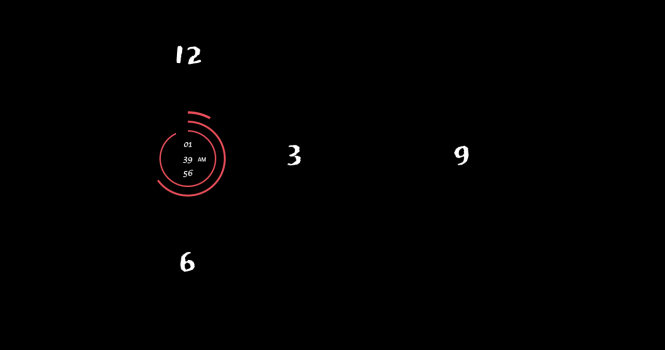
Learn to create simple clock using javascript.
DEMO
HTML
CSS
JavaScript
    <div class="clock">
       <div id="sec-circle"></div>
       <div id="min-circle"></div>
       <div id="hr-circle"></div>
       <div id="am"></div>
    </div>
CSS
    @import url('https://fonts.googleapis.com/css2?family=Kaushan+Script&family=Space+Grotesk&display=swap');

    html, body {
        margin: 0;
        padding: 0;
        background-color: #000000;
    }

    .clock {
        width: 100vw;
        height: 100vh;
        display: flex;
        justify-content: center;
        align-items: center;
        /* position: relative; */
        background-image: url(/clock_background.svg);
        background-repeat: no-repeat;
        background-position: center;
        background-size: 500px;
    }

    .circle {
        border-radius: 50%;
        background-image: linear-gradient(91deg, transparent 50%, #dadada 50%),
    		linear-gradient(90deg, #000000 50%, transparent 50%);
        display: flex;
        align-items: center;
        justify-content: center;
        font-family: 'Permanent Marker', cursive;
    }

    .in-circle {
        transform: scale(1.9);
        position: relative;
        text-align: center;
        border-radius: 100%;
        background-color: #000000;
        display: flex;
        flex-direction: column;
        align-items: center;
        justify-content: center;
        font-size: 10px;
        font-weight: bold;
        color: #FFFFFF;
    }

    .sec-circle {
        height: 120px;
        width: 120px;
        background-color: #E65962;
    }

    .sec-in-circle {
        height: 60px;
        width: 60px;
    }

    .min-circle {
        height: 160px;
        width: 160px;
        background-color: #E65962;
    }

    .min-in-circle {
        height: 80px;
        width: 80px;
    }

    .hr-circle {
        height: 200px;
        width: 200px;
        background-color: #E65962;
    }

    .hr-in-circle {
        height: 100px;
        width: 100px;
    }

    #hr-circle {
        position: absolute;
    }

    #hr-circle::after {
        position: absolute;
        content: '__ Hours';
        color: #FFFFFF;
        top: 60px;
        right: -63px;
        font-size: 16px;
        font-weight: bold;
        font-family: 'Space Grotesk', sans-serif;
        display: none;
    }

    #min-circle {
        position: absolute;
        z-index: 1;
    }

    #min-circle::after {
        position: absolute;
        content: '____ Minutes';
        color: #FFFFFF;
        top: 66px;
        right: -95px;
        font-size: 16px;
        font-weight: bold;
        font-family: 'Space Grotesk', sans-serif;
        display: none;
    }

    #sec-circle {
        position: absolute;
        z-index: 2;
    }

    #sec-circle::after {
        position: absolute;
        content: '_______ Seconnds';
        color: #FFFFFF;
        bottom: 32px;
        right: -123px;
        font-size: 16px;
        font-weight: bold;
        font-family: 'Space Grotesk', sans-serif;
        display: none;
    }

    #am {
        position: absolute;
        z-index: 2;
        color: #FFFFFF;
        font-size: 12px;
        margin-left: 60px;
        margin-top: 3px;
        font-family: 'Space Grotesk', sans-serif;
    }
JavaScript
    var second = document.getElementById('sec-circle');
    var minute = document.getElementById('min-circle');
    var hour = document.getElementById('hr-circle');
    var amPm = document.getElementById('am');
    var sCount = mCount  = 60;
    var hCount = 12;
    var am = '';

    setInterval(() => {
        var m = new Date().getMinutes();
        var s = new Date().getSeconds();
        var h = new Date().getHours();

        s = s < 10 ? `0${s}` : s;
        m = m < 10 ? `0${m}` : m;
        am = h < 12 ? 'AM' : 'PM';
        h = h > 12 ? h - 12 : h;
        h = h < 10 ? `0${h}` : h;


        var sPer = Math.round(s / sCount *100);
        var mPer = Math.round(m / mCount *100);
        var hPer = Math.round(h / hCount *100);

        second.innerHTML = `
        <div class="circle sec-circle" style="background-image: ${getPercentage(sPer)}">
            <div id="second" class="in-circle sec-in-circle">
                <div>${h}<div>
                <div>${m}<div>
                <div>${s}<div>
            </div>
        </div>
        `;

        minute.innerHTML = `
        <div class="circle min-circle" style="background-image: ${getPercentage(mPer)}">
            <div id="second" class="in-circle min-in-circle"></div>
        </div>
        `;

        hour.innerHTML = `
        <div class="circle hr-circle" style="background-image: ${getPercentage(hPer)}">
            <div id="second" class="in-circle hr-in-circle"></div>
        </div>
        `;

        amPm.innerHTML = am;
    });

    function getPercentage(perc) {
        degs = perc / 100 * 360;
        if (degs <= 180) {
            return `linear-gradient(${90 + degs}deg, transparent 50%, #000000  50%),linear-gradient(90deg, #000000 50%, transparent 50%);`;
        } else {
            return `linear-gradient(${degs - 90}deg, transparent 50%, #E65962  50%),linear-gradient(90deg, #000000 50%, transparent 50%);`;
        }
    }
Comments
Leave a Comment
Your email address will not be published.
Categories
You May Also Like
Javascript
Clock
30 March 2026
HTML & CSS
Responsive lightbox
4 February 2025
Javascript
Display pdf as image
10 July 2025
Javascript
Custom Calendar
10 July 2025
Javascript
Circular Progress Bar
16 August 2024
HTML & CSS
Adaptive Navbar
10 July 2025
Javascript
JavaScript Currying
9 March 2024
Javascript
Google reCAPTCHA
10 July 2025
Javascript
Braintree
10 July 2025
jQuery
Image Slider
10 July 2025
